Found something useful? Don't forget to leave a comment!


Showing posts with label internet. Show all posts

Saturday, June 26, 2010

The College Survey Scam

College students are a population that can reliably be characterized as “poor” and “constantly in need of money”; I am no exception. While this is unfortunate enough in itself, even worse are the existence of scams designed to prey off this demographic. I got an email today from a “James Scott” (very likely a fake name) from UniversitySurvey.org, claiming to offer summer part-time work for college students:

Our market research program offers competitive payment for participants in 
simple on-line surveys and evaluations. Our Internet-based program is designed
as a part-time job with a flexible schedule.


Sounds innocuous enough in itself. But if you actually go to the website, you’ll find that the direction of money flow isn’t as expected: first you have to sign up for their program and pay a $29.99 fee. This should send up a red flag for any individual with half a brain. Indeed, a quick inspection of the email headers reveals some questionable tidbits.


Received: from 85-130-2-78.2073232469.ddns.cablebg.net ([85.130.2.78] helo=ee)
by luna.superhosting.bg with esmtpa (Exim 4.69)
(envelope-from <j.scott@universitysurvey.org>)
id 1OSdhB-0000Mh-42


The email was sent from some Bulgarian cable ISP. If you do an nslookup on the UniversitySurvey.org domain, you’ll find that its address (91.196.124.22) is registered to a Bulgarian webhost.


If you plug that IP address into whois, you’ll find that this domain is registered in Bulgaria. Maybe this James Scott guy is some clever American entrepreneur who’s decided to set up shop in southeastern Europe. More likely, it’s just a lowlife, unemployed Slavic scumbag looking to get rich (like that will ever happen).


If I didn’t have better things to do (and if I could actually speak Bulgarian), I’d be giving that ISP (and the scam’s payment processing company) a nice long call. Ah well…just don’t fall for it!


P.S.: On the website they list a US contact address: “10685-B Hazelhurst Dr., Houston, Texas 77043 US”. In any case, this is still highly suspect…


P.S. 2: They also claim to have 24/7 customer support. Wouldn’t hurt to shoot ‘em a message and see just how fake they are.

Tuesday, April 20, 2010

mktorrent-GUI version 1.35 released

Version 1.35 is a major release and supports the saving and loading of profiles. These profiles allow heavy torrenters to quickly import sets of tracker URLs. Additionally, most fields are now persistent – in other words, their content will be preserved in between application sessions.

Go to the main project page for a full readme and the download link.

Wednesday, April 7, 2010

NX: Linux Remote Desktop Access Done Right

Being able to access a computer remotely is becoming a more and more useful feature these days. This is especially true for headless servers and virtual machines, where local/direct access is often not an option. Windows machines (at least the non-home versions have the option of using Remote Desktop, which is a solid and reasonably fast solution. VNC is an option for both Windows and Linux, but it tends to be slow and inefficient as it runs through the framebuffer and is bitmap-based.

I was recently setting up an Ubuntu 9.10 VM for academic programming purposes. Since my (Windows-based) laptop, a four-year-old Dell, is a little underpowered, my plan was to connect to this VM remotely to do all my work. Sure, I could do X forwarding through SSH + PuTTY + Xming or something, but that tends to be somewhat cumbersome, especially when a full desktop is desired. I did try Ubuntu’s VNC-based Remote Desktop feature – it works fine, especially considering the fact that everything was being sent/received over a wireless network. But there was still a bit of lag and window tearing. I wanted something that could really push the envelope of remote computing. A bit of internet research indicated that NX is the king of remote-access technology for Linux, and after field-testing it on my VM and laptop I must say that I would totally agree. Not only is NX speedy, it also provides SSH-based connection security – something VNC can’t do on its own.

Installing and Configuring the NX Server on Ubuntu

An excellent official guide to setting up the open-source FreeNX server software can be found here. The instructions work well for the latest version of Ubuntu at the time of this writing, 9.10.

Installing and Configuring the NX Client on Windows

The preferred client is provided by NoMachine. The setup package can be downloaded here. The latest version at this time is 3.4.0-7.

After running the install, you can create a new connection profile by running the NX Connection Wizard. The questions are fairly straightforward – give your session a name, supply the server hostname, etc. For Ubuntu you want to use the Unix connection type. Set the desktop to GNOME or KDE if you have it installed. One of the nice things about NX is that it can dynamically set up the resolution. You can choose fullscreen or a specific resolution. Note that if fullscreen is used, you will still be able to ALT+TAB out of the NX window if you want to go back to your Windows desktop/programs for a bit.

Once a profile has been created, you can just use the NX Client for Windows shortcut. Type in your username + password (same as your local Linux credentials), wait a few seconds, and boom! Your Linux desktop in all its glory should appear. The claim that NX can achieve near-local-speed responsiveness is certainly not a joke, as I’m sure most users of it would agree.

nx

Saturday, February 6, 2010

The Guide to Safe Torrenting: College Edition

The ubiquity and ease of use of the BitTorrent P2P protocol has attracted to it a countless number of users. But as with any P2P technology, it carries with it risks, especially in the context of copyrighted content. The MPAA, RIAA, and other so-called antipiracy outfits acting as mercenaries on behalf of content owners employ a variety of controversial techniques in an attempt to catch people downloading or uploading a torrent red-handed. The successful capture of a name, or more likely IP address can have some pretty undesirable legal consequences, particularly in the United States due to the Digital Millenium Copyright Act (DMCA). A cease-and-desist letter is usually sent, followed by a demand for a large, financially burdening out-of-court settlement. This threat is especially damaging on college and university campuses, where the user base is young and often ill-informed about P2P safety, not to mention poor! Furthermore, colleges and universities often have their own, equally undesirable sanctions should they have to forward a copyright claim letter to the student. The risk of being pursued for copyright infringement, however, can be significantly minimized if one knows how to keep a low surface profile on the network. Here are several tips and tricks that will help reduce the risks of using BitTorrent on a college network, or more generally, a high-risk environment.

  1. Refrain from downloading new, high-profile content in the days following its release
    Content creators and their hired copyright watchdogs are almost certain to be monitoring torrents of newly released movies and (possibly to a lesser extent) music and software. Don’t let the temptation of downloading a brand-new film screw you over – if you wait at least a week, the dangers of connecting to bad peers is significantly reduced.
  2. Limit your speed
    As with #1, it’s all about discipline, discipline, discipline. Is it really going to kill you to wait an hour or two extra to finish that torrent? If you’re maxing out your upload/download capacity for extended periods of time (especially likely if using a private tracker), red flags are going to start popping up. Any half-brained network administrator worth his salt will be suspicious and look to investigate. If your ISP doesn’t bust you, any antipiracy groups that happen to be monitoring the torrent will be drawn to high-speed peers.
  3. Use protocol encryption
    All the modern and major BitTorrent clients, including uTorrent, Transmission, and Vuze, support a feature called protocol encryption. Basically, the headers of any BitTorrent packets are obfuscated to disguise the nature of the traffic. Note that the actual data in the packet is not encrypted, however. Though this method is not at all foolproof, it will at least create a shadow of doubt as to the nature and purpose of that high-volume traffic going through the network.
  4. Use an IP blocklist
    As with #3, this method is nowhere near foolproof. However, it will afford you some protection in that it prevents you from connecting to known bad/malicious IP addresses that might be connected to watchdog groups/government agencies/etc. Several of the leading torrent clients support loading a blocklist in one format or anoather. If you’re using uTorrent, be sure to checkout my uTorrent IPFilter Updater, an in-house production of Binary Inspirations.
  5. Use private trackers, if possible
    Of course, this is not an option that’s feasible for everyone, including the casual user and newcomers into the BitTorrent world. Since private trackers have a limited user base, the risk of being monitored by copyright outfits is lower than on a public tracker. The smaller and more obscure the site, the less likely that any members are “double agents”. Additionally, some private sites have entry requirements and interviews that make it more difficult for malicious users to infiltrate (though not impossible - *cough* TorrentLeech *cough*!) The fast speeds and other perks of private trackers make them an option worth investigating if you haven’t already.

Friday, January 29, 2010

mktorrent-GUI version 1.0 released

mktorrent-GUI is a Windows-based GUI frontend to the console-based (Linux/UNIX native) mktorrent tool. There don’t seem to be any decent standalone torrent file creators on Windows. There is MakeTorrent, but that was last updated in 2004 and doesn’t support more modern features like private flags. My frontend aims to address these shortcomings and expose all of the functionality of mktorrent to the user via an easy-to-use interface.

Of particular interest to hardcore torrenters is the batch mode feature. If a directory is specified as a source, mktorrent-GUI will scan one level deep for subdirectories and automatically create a torrent for each subdirectory. All of the usual features such as comments, piece size and the private flag can be set.

More information and download link:
mktorrent-GUI version 1.0

Wednesday, August 19, 2009

Get your TV fix for (almost) free


Cut the Cable Bill - PC World

Long time no see, I know. That’s what a dose of Florida sunshine will do to you.

Anyway, PC World just posted a decent article on the many choices out there for getting national-network TV content for free. Hulu has always been a perennial favorite, but did you know that YouTube is also starting to host a select variety of shows (including MythBusters)? One can also connect directly to the major networks’ websites, but this often has more location restrictions – BBC is available only to those in the UK. More exotic options include desktop apps like XBMC and Boxee. Those not afraid of spending some cash might look at an Apple TV (ahhh, Apple!) or even running out and buying that entire season of a show on DVD.

Last but not least, I would like to shamelessly plug the option of torrenting your TV content. ‘Nuff said.

Monday, June 8, 2009

uTorrent IPFilter Updater (uTIPF) v1.5.6 released

Version 1.5.6 of my uTorrent IPFilter Updater (uTIPF) is now available. This is a point release that adds date checking to the update logic. Instead of blindly downloading the filter list like before, uTIPF first checks to see if the client-side list is already up-to-date. If so, uTIPF will notify the user and exit.

The new version is live and available as usual at

http://sites.google.com/site/whitehat2k9/Home/my-programs/utorrent-ipfilter-updater

Portable Apps Relaunch - Mozilla Firefox Ultimate Edition

The Portable Apps section of the site has been languishing for awhile now. What better way to revive it than with the release of an all-new, never-before seen portable app?

ffultimate

Mozilla Firefox Ultimate Edition may sound cheesy, but this portable powerhouse is no joke. This custom spin adds integrated Flash, Java, PDF, and Quicktime multimedia capabilities to the venerable Firefox browser – all in one neat package that’s ready-to-run from a USB stick or network drive.

*Firefox 3.0.10
*Foxit Reader 3.0 build 1506 w/ Firefox plugin
*Java SE 6 Update 14
*Adobe Flash 10.0.22.87
*QT Lite 2.9.0 (http://www.codecguide.com)

For more info and download links, head over to http://sites.google.com/site/whitehat2k9/Home/my-programs/portable-apps/mozilla-firefox-ultimate-edition

And don’t forget to check out the rest of the BINARY INSPIRATIONS Portable Apps Collection at http://sites.google.com/site/whitehat2k9/Home/my-programs/portable-apps.

Sunday, May 3, 2009

ScienceHD – A Unique Sci-Fi/HD/Documentary Oriented Tracker

ScienceHD (http://sciencehd.net) is now open for signups. Get yours quick – the current max user limit is at 5,000 and more than 4,400 users have already been enabled. Upon first glance, I am very impressed with this Gazelle-based BitTorrent tracker. The layout is clean and tasteful, and the current selection holds a lot of variety: National Geographic, Penn and Teller, History Channel, etc. I’m sure ScienceHD will prove to be a big hit for those who love learning. I’ve already got my eye on a Discovery Channel special on Chernobyl.

Undoubtedly, the site has a lot of potential and is off to a strong start. I enthusiastically encourage all those interested to sign up now!

scihd

Friday, April 17, 2009

Court Finds Pirate Bay Founders Guilty, slapped with 1-Year Jail Sentence and $3.6M fine

The Pirate Bay Verdict and the Future of File Sharing - PC World

155315-pirate-banner_180

Today is a sad, sad, day for pirates and file-sharing enthusiasts alike. It’s all over the interwebs now: A Swedish court has ruled that the four founders of the popular BitTorrent tracker The Pirate Bay are guilty of “assisting in making copyright content available”.

Quite frankly, the verdict is shocking given the technical competence of the prosecution and their inability to make a solid case.

Best of luck to the TPB team as they try to combat this BS verdict and appeal, but if worst comes to worst, rest assured that file-sharing, P2P, and BitTorrent will be around for some time to come, thanks to rapidly evolving decentralized networking tech as well as the inumerable small-scale and private P2P networks and sites/trackers.

Long live the pirates!

Tuesday, April 7, 2009

A List of 900 Private Torrent Sites

900 Online Private Torrent Trackers: 2009 Edition | THE source for BitTorrent & P2P Tips, Tricks and Info. | FileShareFreak

For all you hardcore BitTorrent and file-sharing/P2P aficionados, you may find this quite exhaustive compilation of BT trackers from FileShareFreak quite interesting. If you have enough time to vet all of them, you really do have too much time on your hands.

Check out a book…with Google Book Downloader

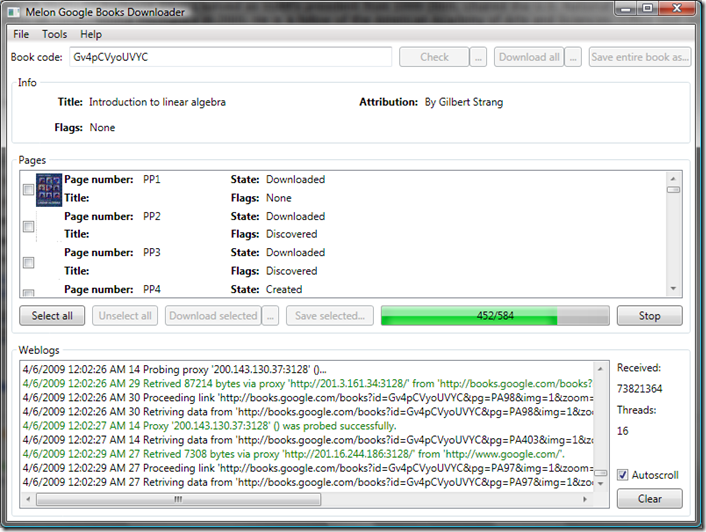
Google Book Search and its ambitious scanning project have put many of the world’s finest literary and scientific works at our fingertips. One can download entire works if they are public domain or are no longer under copyright, but for current-market books only a preview of a certain number of pages is allowed. So…let’s say, hypothetically, that you DESPERATELY need the full text of a book, but don’t feel like making a late-night trip to the library. What then? Why, it’s Google Book Downloader to the rescue!

This handy little tool, written in C#, solves your literary woes. Simply input the Google BookID (found in the URL of the original Google Books page) and hit Check. Once that completes, click “Download All” and GBD does the rest by systematically downloading the pages in a randomized order (boy, does that make sense :) Finally, click “Save entire book as” the temporary downloaded pages are compiled into a nice, neat PDF. The GUI could use a little work, but once you figure out how to use the tool things work out nicely. PDF creation is handled by iTextSharp, the C# port of the popular iText Java library.

GBD in action:

gbd

http://googlebookdownloader.codeplex.com/ (.NET Framework 3.5 is required.)

Note that I do NOT condone any illegal or unsavory use of this software. Have a nice day.

Saturday, March 21, 2009

Cat and Mouse: uTorrent IPFilter v1.5.5 released

Today marks the release of version 1.5.5 of my uTorrent IPFilter Updater. The application logic has been expanded again so that both .GZ and .ZIP file formats are supported (whatever the people at blocklistpro.com feel like using…they keep on changing it!) Hopefully, we’re getting to a point where the amount of changes to the website and download interface/methods has arrived at a minimum.


On a side note, Vista 64-bit is now officially supported.

Hit ‘er up below, as always.

http://sites.google.com/site/whitehat2k9/Home/my-programs/utorrent-ipfilter-updater

Thursday, March 19, 2009

uTorrent IPFilter Updater to be updated, again


Blocklistpro.com pulled another switcheroo with their latest March 20th blocklists. A new version of my Updater will be out soon to address this.

Friday, February 27, 2009

uTorrent IPFilter Updater v1.5.4 Released

This new version address some changes to the blocklistpro.com download site.
A brief changelog:

  • license agreement detection (the license agreement page was removed again recently, but the Updater should still work if it is enabled again in the future)
  • support for the new ZIP downloads
  • -paranoid option (use if you want to grab the paranoid list instead)
  • fixed download limit detection bug

For the next release, I plan to add intelligent date detection so that the Updater will know if you have the latest version or not.

As usual, you can grab it from
http://sites.google.com/site/whitehat2k9/Home/my-programs/utorrent-ipfilter-updater

Tuesday, February 3, 2009

uTorrent IPFilter Updater v1.5.2 Released

It seems that blocklistpro.com is trying to make it even harder for people to download their lists - recently they implemented a license agreement (checkbox + button) that you have to agree to before it releases the download. The new Updater, v1.5.2, is capable of handling this silly little addition. As always, you may find more information and the download links at the main page:
http://sites.google.com/site/whitehat2k9/Home/my-programs/utorrent-ipfilter-updater

Thursday, January 22, 2009

uTorrent IPFilter Updater v1.5.1 Released + Adventures with Python

UPDATE: Version 1.5.1 was released on Jan. 27, 2009. This fixes a critical bug with a link that should have been dynamic instead of hardcoded, causing an error of “Download Link Not Found”. The new application logic accounts  for this correctly.

The all-new version 1.5 of my popular uTorrent IPFilter Updater has been released! Ever since the old Bluetack site stopped providing the downloads, all the files have been served from a new site – blocklistpro.com. I’ll admit that the new interface and web design is pretty spiffy, but it’s become a major pain in the ass as everything goes through a Remository backend that discourages automated downloads. The download links change regularly and are NOT regular files – rather, files are served through a script, and the system seems to implement a download limit of 3 times a day. Naturally, this fundamentally screwed all earlier versions of my updater.

Clipboard01

Being a self-proclaimed lazy fool, I vowed to create a program/script that could deal with this unpredictable dynamicness. This sort of task was just begging for a cheat-friendly, high-level language. Thinking what I’m thinking? Python! With its excellent gzip, urllib2 and re (regular expression) modules, Python is well-suited for this type of thing. Especially with its regex capabilities, it is a very powerful language when it comes to string manipulation. I was quickly able to cobble up a Python version of the updater that does the following:

  1. Check to make sure you have uTorrent installed!
  2. Fetch the HTML source of the info page containing the blocklist download link.
  3. Use a regex search to isolate the download link. (Necessary since the link is changing)
  4. Launch wget to do the dirty download work.
  5. Uncompress the resulting .GZ file.
  6. Move the ipfilter.dat to the uTorrent AppData folder.

The seasoned Python guru might ask why I chose to use wget, an external utility, instead of the built-in urllib/urllib2 modules to do the downloading. Quite simply, I would have had to do more coding (percent bars, screen output, etc.) Besides, wget is a capable and well-known downloading tool…

As I mentioned earlier, the new download site has a download limit; the Updater does nothing to circumvent this (probably unfeasible anyway). If the Updater detects that you have reached the download limit, it will exit with an error message noting that.

***For now, version 1.5 contains no new features and does more or less the same thing as the previous versions.***

If you already have Python 2.6.x installed, you may just run the plaintext script (see readme). For you non-Pythoners out there, I’ve created an EXE version using the excellent py2exe tool. To run the EXE version, though, you will need the Visual Studio 2008 SP1 Redistributable. Download that from Microsoft here.

To-do list:

  • add an option to allow downloading of the "paranoid” ipfilter
  • smart checking of local/remote file dates to prevent unnecessary downloads

For more info and the download link, visit the program webpage at

http://sites.google.com/site/whitehat2k9/Home/my-programs/utorrent-ipfilter-updater

Thursday, January 8, 2009

Get your Windows 7 Beta Tomorrow

How to Get Your Windows 7 Beta 1 on Friday | Epicenter from Wired.com

Sometime tomorrow, Friday, January 9, Microsoft will open up Windows 7 to the public by offering downloads of Windows 7 Beta 1 to the first 2.5 million visitors. Registration for a key is required, and the beta expires in August. If you want to get in on some next-gen Windows action, stay tuned to the official Windows 7 webpage throughout the day, as a specific time has not been announced.

http://www.microsoft.com/windows/windows-7/

Tuesday, November 25, 2008

The Definitive Guide to Free Music + the Internet

The vastness of the Internet is home to a myriad of entertainment sources, particularly music. Traditionally, getting your tunes meant walking into your local music store and purchasing CDs (or heaven forbid, vinyl!) Naturally this implies cost and money. As you'll see, though, the Internet is an excellent channel for satisfying your musical fix quickly without costing you a penny.

image

In order of increasing tech-savviness:

  1. Streaming Audio/Video - YouTube is the most prominent player in this category, but innumerable other sites exist. Unofficial user creations as well as official releases can be found - just be wary of the often disorganized nature and varying quality.
  2. Online Radio - With the likes of Shoutcast, Pandora, and last.fm, online radio services provide a user-friendly solution. In exchange for ads or partial tracks, people can listen to both mainstream and indie artists.
  3. Music Portals/Sites - iTunes and the Zune Store might be great for those willing to fork over some dough, but people often don't realize that free music download joints exist as well. The service that comes to mind first is SpiralFrog. In exchange for an ad-laden site and heavily DRM'ed Windows Media Audio files, you get the latest tunes for free. For college students who have a .edu email address, a somewhat more polished service exists - Ruckus. Like SpiralFrog, they force you to live with an onslaught of website ads and WMA DRM. It's a difficult choice - pay for "free" non-DRM music, or pay nothing for "locked" DRM tracks?
  4. Other P2P - Besides BitTorrent, a number of other P2P networks exist. Think Frostwire/Limewire, Ares, etc. In my humble opinion, centralized, node-based P2P networks are on their way out. Nevertheless, you will likely find a decent array of music out there. Beware, though - files are often improperly/incompletely tagged and quality varies from amazing to abysmal. Additionally, the risk of coming across a malicious/fake file is significant.
  5. BitTorrent - I would have lumped this with P2P in general, but the extraordinarily high prevalence of music on BT deserves a special mention. Public trackers like Mininova and The Pirate Bay provide a respectable mix of more mainstream/well-known artists. For the tech-savvy, elite private trackers such as Waffles and what.cd serve up a delectable variety of lesser-known works; high quality releases are the norm with lossless FLAC rips of entire albums. In general, one can expect high quality when using BitTorrent - usually, tracks are properly named and labeled, and of consistent bitrate.

Whatever route you decide to go with, realize that getting good music doesn't mean forking over an arm or leg for a new album. Countless other listeners out there enjoy good music as much as you, and, especially in the case of P2P, have been kind enough to share their musical treasures with you.

Quick Tip: Maximize your Firefox viewing experience with Tiny Menu

If you are short on screen space or simply want to maximize your viewing area (like me), I highly recommend that you try out the Firefox Tiny Menu extension. Basically, it compresses your entire menubar - from "File" to "Help" into a short and sweet mini-menu. Then you can consolidate your toolbars and end up with something uber-cool like my setup below:

tinymenu_ffdemo

Grab it at https://addons.mozilla.org/en-US/firefox/addon/1455.