Found something useful? Don't forget to leave a comment!


Showing posts with label piracy. Show all posts

Wednesday, July 28, 2010

SLIC 2.1 BIOS mod for Gigabyte H55M-UD2H

This is the F9 release BIOS. Tested successfully on a revision 1.0 board.

Disclaimer: BIOS flashing is, of course, a potentially risky operation. All the mods below have been flashed and tested successfully, but I am not responsible for anything that happens due to the use of these mods.

Board model: Gigabyte H55M-UD2H
BIOS type: Award
BIOS version: F9
SLIC OEM: Acer[ACRSYSACRPRDCT-ANNI]2.1.BIN
Mod method: SSV3
Download: http://www.box.net/shared/fbq5xcrg7t

Sunday, May 9, 2010

SLIC 2.1 BIOS mod for Gigabyte MA78LM-S2H

Here’s another BIOS mod, this time for the Gigabyte MA78LM-S2H. The version is F10 and is current as of this post. Tested successfully on a revision 1.3 board, and should work on all earlier revisions.

Disclaimer: BIOS flashing is, of course, a potentially risky operation. All the mods below have been flashed and tested successfully, but I am not responsible for anything that happens due to the use of these mods.

Board model: Gigabyte MA78LM-S2H
BIOS type: Award
BIOS version: F10
SLIC OEM: Acer[ACRSYSACRPRDCT-ANNI]2.1.BIN
Mod method: SSV3
Download: http://www.box.net/shared/vs2sf00y81

Wednesday, March 24, 2010

Howto: Download TurboTax state forms for free

TurboTax is great for filling out those pesky tax return forms without relying too much on manual brainpower, especially if you have a complex tax situation. The federal forms are free, but TurboTax only lets you file one state return free of charge. If you need additional state forms, it’ll run you $39.95 each. Needless to say, this is a pretty ridiculous fee when you could buy another copy of TurboTax (Deluxe) for a similar price. Fortunately, there’s a way to remedy this…inconsistency.

DISCLAIMER: THE FOLLOWING TUTORIAL IS FOR EDUCATIONAL PURPOSES ONLY. I DO NOT CONDONE THE USE OF THIS INFORMATION FOR FRAUD OR OTHER ILLEGAL PURPOSES, AND AM NOT RESPONSIBLE FOR ANY CONSEQUENCES SUFFERED AS A RESULT OF USING THIS INFORMATION.

The basic premise is to install and use TurboTax in a virtual machine. There are several VM solutions out there, but this guide will illustrate the use of VirtualBox. VirtualBox is free and lightweight, making it ideal for the relatively simple task here. We will use the snapshot feature of VirtualBox to create an image of the TurboTax install BEFORE downloading the first free state. After downloading the free state, the virtual machine can be reset to this snapshot, whereby another state can be downloaded for free.

You might complain about having to use TurboTax in a virtual machine – true, it’s slightly more inconvenient, but who doesn’t like the added layer of security?

Materials needed:

  • VirtualBox (download here)
  • Windows XP/Vista/7 install media
  • TurboTax (2009) [duh!]

Prepare the Virtual Machine for TurboTax

Install VirtualBox if you haven’t already, using the download link above.

Install your virtual operating system of choice in VirtualBox. The intricacies of this will not be covered here. However, I recommend Windows XP since it is smaller in size than Vista or 7.

Install the VirtualBox Guest Additions (highly recommended). This enhances the video quality in the guest OS and also allows shared folders, which can make it easier to transfer files (e.g. tax documents).

*If your guest operating system is Windows XP or Windows Vista, you will first need to install the .NET Framework 3.5 SP1. (web installer, full offline installer)

Install TurboTax (2009) into the guest operating system. Run the application and allow it to grab updates, then exit out. Shut down the guest OS.

From the VirtualBox interface, create a snapshot of your VM.

tt2

Download the 1st free state

Start up the virtual machine and open up TurboTax.

Click “Start a New Return”.

Go to the “State” menu. Keep clicking “Continue” until a window pops up asking you to choose a state to download for free. Proceed with the download.

tt3

Once the download is finished, quit TurboTax. Navigate to the location “C:\Program Files\TurboTax\Forms”.

tt1

Of the directories listed, it should be relatively easy to pick out the one that corresponds to the state you just downloaded (e.g. ohi_09 corresponds to the 2009 Ohio forms). Simply transfer this folder (zip it up first if you’d like) to your real OS, or any other permanent storage location.

Shut down the VM.

Reset the VM and download more states for free

Go to the snapshots menu in the VirtualBox interface (see screenshot above). Right click the snapshot you made and hit the “restore” option.

Reboot the VM. The VM and the TurboTax install are now in the original state (no pun intended) where it will allow you to download one more set of state forms for free.

Repeat the process described above to download the state forms.

Rinse and repeat, if desired.

Add the state forms back into TurboTax

Now that you have all the state forms you need, it’s time to add them back into TurboTax. Copy/move these form directories back into the “C:\Program Files\TurboTax\Forms” on your virtual machine.

The next time you start up your virtualized TurboTax install, it should scan and pick up these new forms. You can now proceed to use TurboTax normally. If desired, the new form files can also be added into the forms directory of a TurboTax installed in a real OS.

Saturday, February 6, 2010

The Guide to Safe Torrenting: College Edition

The ubiquity and ease of use of the BitTorrent P2P protocol has attracted to it a countless number of users. But as with any P2P technology, it carries with it risks, especially in the context of copyrighted content. The MPAA, RIAA, and other so-called antipiracy outfits acting as mercenaries on behalf of content owners employ a variety of controversial techniques in an attempt to catch people downloading or uploading a torrent red-handed. The successful capture of a name, or more likely IP address can have some pretty undesirable legal consequences, particularly in the United States due to the Digital Millenium Copyright Act (DMCA). A cease-and-desist letter is usually sent, followed by a demand for a large, financially burdening out-of-court settlement. This threat is especially damaging on college and university campuses, where the user base is young and often ill-informed about P2P safety, not to mention poor! Furthermore, colleges and universities often have their own, equally undesirable sanctions should they have to forward a copyright claim letter to the student. The risk of being pursued for copyright infringement, however, can be significantly minimized if one knows how to keep a low surface profile on the network. Here are several tips and tricks that will help reduce the risks of using BitTorrent on a college network, or more generally, a high-risk environment.

  1. Refrain from downloading new, high-profile content in the days following its release
    Content creators and their hired copyright watchdogs are almost certain to be monitoring torrents of newly released movies and (possibly to a lesser extent) music and software. Don’t let the temptation of downloading a brand-new film screw you over – if you wait at least a week, the dangers of connecting to bad peers is significantly reduced.
  2. Limit your speed
    As with #1, it’s all about discipline, discipline, discipline. Is it really going to kill you to wait an hour or two extra to finish that torrent? If you’re maxing out your upload/download capacity for extended periods of time (especially likely if using a private tracker), red flags are going to start popping up. Any half-brained network administrator worth his salt will be suspicious and look to investigate. If your ISP doesn’t bust you, any antipiracy groups that happen to be monitoring the torrent will be drawn to high-speed peers.
  3. Use protocol encryption
    All the modern and major BitTorrent clients, including uTorrent, Transmission, and Vuze, support a feature called protocol encryption. Basically, the headers of any BitTorrent packets are obfuscated to disguise the nature of the traffic. Note that the actual data in the packet is not encrypted, however. Though this method is not at all foolproof, it will at least create a shadow of doubt as to the nature and purpose of that high-volume traffic going through the network.
  4. Use an IP blocklist
    As with #3, this method is nowhere near foolproof. However, it will afford you some protection in that it prevents you from connecting to known bad/malicious IP addresses that might be connected to watchdog groups/government agencies/etc. Several of the leading torrent clients support loading a blocklist in one format or anoather. If you’re using uTorrent, be sure to checkout my uTorrent IPFilter Updater, an in-house production of Binary Inspirations.
  5. Use private trackers, if possible
    Of course, this is not an option that’s feasible for everyone, including the casual user and newcomers into the BitTorrent world. Since private trackers have a limited user base, the risk of being monitored by copyright outfits is lower than on a public tracker. The smaller and more obscure the site, the less likely that any members are “double agents”. Additionally, some private sites have entry requirements and interviews that make it more difficult for malicious users to infiltrate (though not impossible - *cough* TorrentLeech *cough*!) The fast speeds and other perks of private trackers make them an option worth investigating if you haven’t already.

Tuesday, September 22, 2009

A Collection of SLIC 2.1 BIOS mods

Here’s a list of all my SLIC 2.1 modded BIOS, created for educational purposes. For more information on what these do, please see: http://forums.mydigitallife.info/showthread.php?t=6921. As detailed there, the mods were performed using AndyP’s AMI and Award Mod Tools. All files below are archives containing the modded BIOS, the corresponding XRM-MS certificate, and a suitable DOS flashing tool. For more information on DOS BIOS flashing, please see my previous post.

Disclaimer: BIOS flashing is, of course, a potentially risky operation. All the mods below have been flashed and tested successfully, but I am not responsible for anything that happens due to the use of these mods.

UPDATE 05/08/2010: MA785GM-US2H updated to new F10 BIOS.

UPDATE 03/31/2010: MA785GM-US2H updated to new F8 BIOS.

UPDATE 10/09/2009: Foxconn A7DA-S updated to new 81BF1P09 BIOS.

Board model: ASRock A780GMH/128M
BIOS type: AMI
BIOS version: P1.20
SLIC OEM: Acer[ACRSYSACRPRDCT-ANNI]2.1.BIN
Mod method: SSV3
Download: http://www.box.net/shared/122kmxsark

Board model: ECS MCP61PM-AM
BIOS type: Award
BIOS version: 1.12GS
***NOTE: This is an OEM board used in the eMachines T5234 and possibly some Gateway models.***
SLIC OEM: Acer[ACRSYSACRPRDCT-ANNI]2.1.BIN
Mod method: Dynamic (due to presence of existing Vista SLIC 2.0 table)
Download: http://www.box.net/shared/uc6kzkjzo2

Board model: ECS MCP61PM-HM
BIOS type: Award
BIOS version: 5.27
***NOTE: This is an OEM board used in the Compaq SR5110NX.***
SLIC OEM: Acer[ACRSYSACRPRDCT-ANNI]2.1.BIN
Mod method: Dynamic (due to presence of existing Vista SLIC 2.0 table)
Download: http://www.box.net/shared/547p9eml6i

Board model: Foxconn A7DA-S (Socket AM2+ DDR2 version, NOT the new 3.0!)
BIOS type: AMI
BIOS version: 81BF1P09
SLIC OEM: Acer[ACRSYSACRPRDCT-ANNI]2.1.BIN
Mod method: SSV3
Download: http://www.box.net/shared/fp5lcr777f

Board model: Gigabyte MA78GM-S2HP
BIOS type: Award
BIOS version: F5
SLIC OEM: Acer[ACRSYSACRPRDCT-ANNI]2.1.BIN
Mod method: SSV3
Download: http://www.box.net/shared/rjsk4tfrp7

Board model: Gigabyte MA785GM-US2H
BIOS type: Award
BIOS version: F10
SLIC OEM: Acer[ACRSYSACRPRDCT-ANNI]2.1.BIN
Mod method: SSV3
Download: http://www.box.net/shared/94rvdqg79i

Friday, April 17, 2009

Court Finds Pirate Bay Founders Guilty, slapped with 1-Year Jail Sentence and $3.6M fine

The Pirate Bay Verdict and the Future of File Sharing - PC World

155315-pirate-banner_180

Today is a sad, sad, day for pirates and file-sharing enthusiasts alike. It’s all over the interwebs now: A Swedish court has ruled that the four founders of the popular BitTorrent tracker The Pirate Bay are guilty of “assisting in making copyright content available”.

Quite frankly, the verdict is shocking given the technical competence of the prosecution and their inability to make a solid case.

Best of luck to the TPB team as they try to combat this BS verdict and appeal, but if worst comes to worst, rest assured that file-sharing, P2P, and BitTorrent will be around for some time to come, thanks to rapidly evolving decentralized networking tech as well as the inumerable small-scale and private P2P networks and sites/trackers.

Long live the pirates!

Tuesday, April 7, 2009

A List of 900 Private Torrent Sites

900 Online Private Torrent Trackers: 2009 Edition | THE source for BitTorrent & P2P Tips, Tricks and Info. | FileShareFreak

For all you hardcore BitTorrent and file-sharing/P2P aficionados, you may find this quite exhaustive compilation of BT trackers from FileShareFreak quite interesting. If you have enough time to vet all of them, you really do have too much time on your hands.

Check out a book…with Google Book Downloader

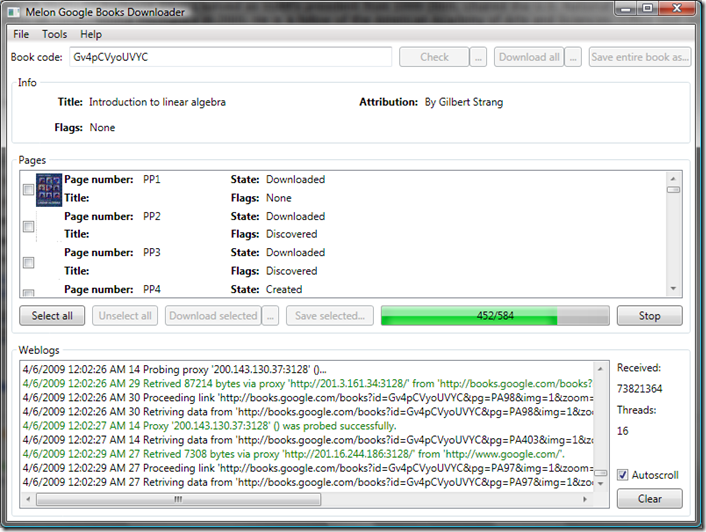
Google Book Search and its ambitious scanning project have put many of the world’s finest literary and scientific works at our fingertips. One can download entire works if they are public domain or are no longer under copyright, but for current-market books only a preview of a certain number of pages is allowed. So…let’s say, hypothetically, that you DESPERATELY need the full text of a book, but don’t feel like making a late-night trip to the library. What then? Why, it’s Google Book Downloader to the rescue!

This handy little tool, written in C#, solves your literary woes. Simply input the Google BookID (found in the URL of the original Google Books page) and hit Check. Once that completes, click “Download All” and GBD does the rest by systematically downloading the pages in a randomized order (boy, does that make sense :) Finally, click “Save entire book as” the temporary downloaded pages are compiled into a nice, neat PDF. The GUI could use a little work, but once you figure out how to use the tool things work out nicely. PDF creation is handled by iTextSharp, the C# port of the popular iText Java library.

GBD in action:

gbd

http://googlebookdownloader.codeplex.com/ (.NET Framework 3.5 is required.)

Note that I do NOT condone any illegal or unsavory use of this software. Have a nice day.

Wednesday, April 1, 2009

Sticking it to the TurboTax Man

Any TurboTax user needing to file forms in more than one state will quickly find that they need to pony up $39.95 per state after the first free state. Almost $40 just for a bunch of electronic forms? Puh-leez. That’s probably enough to buy ANOTHER copy of TurboTax! Considering the current state of the economy, Intuit sure doesn’t seem to be helping its customers.TurboTaxLogo275

Naturally, this led me to some tinkering with TurboTax’s innards. I gotta give them some kudos here – a registry and filesystem sweep turned up nothing on how TurboTax keeps track of what states you have and whether to charge you. Nevertheless, I came to the conclusion that this data must still be present locally as a fresh install on another computer still allowed me to download the first state for free.

After installing TurboTax on a VMWare Workstation install of Windows XP, I was able to download the first “free” state. The downloaded state forms are located in folders in C:\Program Files\Intuit\TurboTax 2008\forms\  (e.g. the Michigan forms are in a directory named mii_08). After zipping that folder up and copying it to the corresponding TurboTax folder on the real computer, TurboTax happily detected the new state forms. Voila – talk about increasing your refund by $40!

Tuesday, February 3, 2009

Windows 7 will only have three versions


» Microsoft simplifies the Windows 7 lineup | Ed Bott’s Microsoft Report | ZDNet.com

Finally, Microsoft has pulled its head out of the sand and simplified the Windows 7 edition lineup (for those of us who don’t lived in a third-world country, at least). There will be 3 clear-cut and easy to understand editions: Home Premium, Professional, and Ultimate (also called Enterprise for volume buyers). Unlike Vista, each edition will contain all features of the edition(s) below it: for example, Professional’s features are a superset of Home Premium’s features, and Ultimate will have all of Professional’s features. Yay! Now slack-off workers can play videos through Media Center will being connected to the corporate domain. Just what we need. But seriously, this is a much more elegant move on Microsoft’s part – no more confusion over what edition to get and heated discussions about which edition is most suitable. And no more hilarious parodies like this:

Monday, September 15, 2008

Quick Tip: Use ConvertXtoDVD to re-encode PAL into NTSC

The United States is all cool with DVDs using the NTSC format of 720x480 and 29.97 fps, but for our foreign buddies the reigning standard is PAL, which specifies a 720x576 picture at 25 fps. Naturally, this causes headaches if you pick up discs in another country and find that your crappy DVD player back home can't handle it (technically, it wouldn't take much to build a dual-format player, but Hollywood and the MPAA freak out.)

Someone was nice enough to lend me an official Chinese version DVD of the Beijing Olympics. I found out the hard way that it was in PAL format - my Sony player spazzed out with a "cannot play" error.

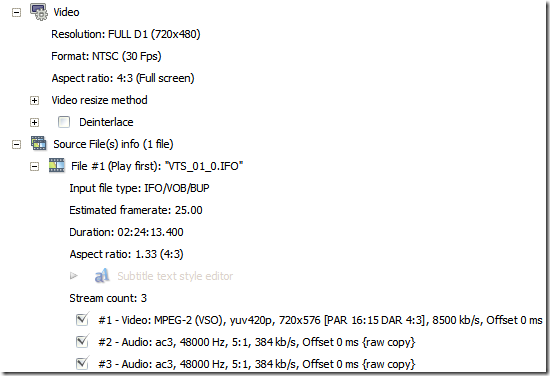
Since I had to return the discs, the only permanent solution was to...err, copy it (yeah, that's right - the IOC or its fanboys better not give me any crap over that.) Browsing through the various DVD-related programs I had at hand, I noticed that ConvertXtoDVD 3 (everyone's favorite DVD making software!) could directly add an IFO/VOB video file from a DVD! How useful indeed. Thanks to ConvertX's one-click simplicity and lightning speed, my quest for PAL-to-NTSC conversion came to a very fast ending. Kudos to the developers - they've created a very user-friendly program that also happens to be extremely versatile and powerful.

cxdvd_pal_to_ntsc

ConvertXtoDVD 3 displaying the source (PAL) and the output (NTSC)

Wednesday, July 23, 2008

uTorrent IPFilter Updater v1.1 Available - Windows 2000/XP/Vista

UPDATE: January 6, 2009

This program no longer works with the new blocklistpro.com download location as the site implements a server-side download limiter which seems to vary the download link. I will try throwing something together, maybe in C# or Python, but no guarantees that this issue will be successfully tackled.

***

A new version 1.1 of my uTorrent IPFilter Updater is now available. This is a minor update fixing just a couple of things.

  • Confirmed compatibility with all recent versions of uTorrent, v1.6 to 1.8
  • Confirmed support for Windows 2000/XP/Vista. If you have trouble on any of these OSes please contact me!
  • Updated wget to 1.11.4 using the binaries and DLLs available here. This should fix any issues caused by missing files - every required file is now included.

To perform an update (once every 1-2 weeks is good), simply run Update.cmd.

utorrent_updater

http://sites.google.com/site/whitehat2k9/Home/my-programs/utorrent-ipfilter-updater

Monday, April 7, 2008

Austalian Police Caught Illegally Pirating Videos

Austalian Police Caught Illegally Pirating Videos | Tom's Hardware

Oh, the irony...at least now they have something to do during long, boring patrols. (after all, laptops in cop cars don't do much anyway).