Found something useful? Don't forget to leave a comment!


Showing posts with label microsoft. Show all posts

Wednesday, July 28, 2010

SLIC 2.1 BIOS mod for Gigabyte H55M-UD2H

This is the F9 release BIOS. Tested successfully on a revision 1.0 board.

Disclaimer: BIOS flashing is, of course, a potentially risky operation. All the mods below have been flashed and tested successfully, but I am not responsible for anything that happens due to the use of these mods.

Board model: Gigabyte H55M-UD2H
BIOS type: Award
BIOS version: F9
SLIC OEM: Acer[ACRSYSACRPRDCT-ANNI]2.1.BIN
Mod method: SSV3
Download: http://www.box.net/shared/fbq5xcrg7t

Thursday, July 1, 2010

rdesktop 1.6.0 for Windows

This is a Cygwin-compiled build of the *nix rdesktop RDP client for Windows machines.
Sound support is included.
Depending on your needs, you may find this to be a useful alternative
to the standard built-in Windows client.

Requirements:
X server for Windows (e.g. Xming or Cygwin X11)
You must have the X server running prior to using rdesktop.

Additionally, the DISPLAY environment variable must be set.
See the included batch script (RDstart.cmd) for an example
of how to set this variable and start rdesktop.

rdesktop is a command-line program: for more information, please
see the original rdesktop website.

DOWNLOAD

Saturday, June 26, 2010

uTorrent IPFilter Updater 1.5.8 released

This is an incremental update that restores functionality with the blocklistpro.com downloads. The source code has been reworked for full Python 3.1+ compatibility, and the EXEs are now built with cx_freeze. Download the new version here: http://sites.google.com/site/whitehat2k9/Home/my-programs/utorrent-ipfilter-updater

Sunday, May 9, 2010

SLIC 2.1 BIOS mod for Gigabyte MA78LM-S2H

Here’s another BIOS mod, this time for the Gigabyte MA78LM-S2H. The version is F10 and is current as of this post. Tested successfully on a revision 1.3 board, and should work on all earlier revisions.

Disclaimer: BIOS flashing is, of course, a potentially risky operation. All the mods below have been flashed and tested successfully, but I am not responsible for anything that happens due to the use of these mods.

Board model: Gigabyte MA78LM-S2H
BIOS type: Award
BIOS version: F10
SLIC OEM: Acer[ACRSYSACRPRDCT-ANNI]2.1.BIN
Mod method: SSV3
Download: http://www.box.net/shared/vs2sf00y81

Tuesday, April 20, 2010

mktorrent-GUI version 1.35 released

Version 1.35 is a major release and supports the saving and loading of profiles. These profiles allow heavy torrenters to quickly import sets of tracker URLs. Additionally, most fields are now persistent – in other words, their content will be preserved in between application sessions.

Go to the main project page for a full readme and the download link.

Tuesday, October 27, 2009

Spice up your Windows with Microsoft’s Own Windows 7 Themes, Gadgets, and more

http://windows.microsoft.com/en-US/windows/downloads/personalize

Microsoft has for download a smorgasbord of themes, ranging from Ferrari to Ducati to Bing to…South Africa? Each one promises a stunning set of new desktop backgrounds. Also available are some awesome standalone backgrounds and a showcase of gadgets. For you early Win7 adopters, check these out! Microsoft has uncharacteristically took a pretty good stab at the world of user customization…

Free Image Hosting at www.ImageShack.us

Tuesday, October 20, 2009

Vertically Center Text on a Page (Word 2007)

word-vertcen

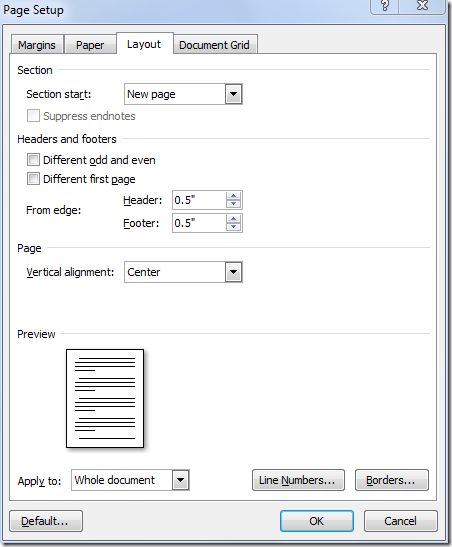
Hey…you learn something new everyday. Have you ever needed to create a title page where the text has to sit in the vertical center of the page? Just go to Page Layout, then hit the little arrow in the lower right of Page Setup. Go to the Layout tab and set Vertical Alignment to center. No more slamming the enter key 50 million times or painstakingly positioning a text book!


Hey, you learn something new every day.

Thursday, October 15, 2009

My Picks: The Best Windows 7 Features

Windows 7’s version number is actually NT 6.1, implying it’s only a minor point release compared to Vista (NT 6.0). But in reality, most would agree that Win7 is a significant step forward in the OS world, even if it’s just a comprehensive improvement of the Vista codebase. Regardless of your opinions on Vista, it’s hard to deny that 7 brings some awesome new features to the table. Here is my Top 10 take on those awesome features, in no particular order.

  1. Sticky Notes
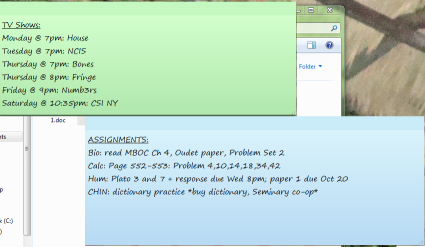
    Functional yet brilliantly simple, these little guys live on your desktop and are a great productivity tool for keeping track of things. Handwriting support on tablets, basic text formatting, and multiple color options are an added bonus.
    stickynotes
  2. The “New” Taskbar
    Vista sorta changed things up, but with Windows 7 the taskbar is a wholly reinvented affair. Program labels are not shown by default – instead, you’re displayed with a list of icons which can be permanently pinned. Software can also be written to take advantage of jumplists, accessible by right-clicking icons. To accomodate all this, the taskbar is now slightly higher, but I believe it’s well worth the small cost in screen space.
    jumplist
  3. Desktop Wallpaper Slideshows
    Macs (which I hate) have had this feature for a while, and on the Windows of the past one had to resort to 3rd-party software. Now Microsoft has made this eye candy part of the OS. Win7 handles hundreds of wallpapers in a folder with ease, and can be set at different intervals to change the wallpaper.
    wall-slideshow
  4. Libraries
    Some people might argue with me for praising this feature. But like it or not, the new Libraries feature in Windows 7 makes folder consolidation a snap. Got some movies on your basement NAS box, music on your HTPC, and photos on your workstation? Just create a library and you can manage and view it all as if it were all in one place, thanks to Win7 Libraries.
    library
  5. New Windows Media Center Features
    These days a lot of PC TV tuners are hybrid, meaning that they can tune analog or digital signals, but not at the same time. Take the Hauppauge HVR-2250, for example – it has DUAL hybrid tuners. Under Vista one could record either two analog streams or two digital strings, but not mix and match – essentially defeating the purpose of having a hybrid tuner in the first place. Now, Win7 allows you to mix and match, recording one analog and one digital stream at the same time. Great for HTPC enthusiasts.
    WMC in 7 now also supports ClearQAM tuning, which was possible in Vista but only with the OEM-only TV Pack 2008. This will be a boon to anyone who subscribes to FiOS TV or any other TV service that uses ClearQAM.
  6. Standardized Monitor Configuration
    In the days of Vista and earlier, advanced monitor configuration was done more or less through the video card driver, either NVIDIA ForceWare or ATI’s Catalyst Control Center. Now everything monitor-related is taken care of through a new, simplified, standardized applet. Regardless of whether it’s a Radeon, GeForce, or crappy Intel card, everything from dual monitors to resolution to cloning is all handled through Windows itself.
    monconfig
  7. Logon Background Customization

    This is something that’ll be more interesting for geeks and OEMs, but is cool nonetheless. In previous Windows versions one had to resort to hacking the resources in the logon shell to achieve the same effect. Now even the average joe can rock out with a super-awesome logon screen! Note, however that support is limited to files <256kb and a certain predefined set of resolutions only.
  8. Unified Network Manager
    The new taskbar networking interface now unifies all of your connection options, whether it’s wireless, wired, or WWAN. The layout is suspiciously reminiscent of NetworkManager on Linux…but anyway, it makes switching/connecting a LOT easier.
  9. Device Stage
    Windows 7 now offers users an overview of all the devices connected to the computer – printers, USB peripherals, hard drives, scanners, cell phones, etc etc. Apparently device developers can use Device Stage to extend the functionality and interaction of their products. We’ll see how that pans out.
    devicestage

There are so many new and improved features in Windows 7 – this is but a smattering of them. Hopefully, you now have an idea of the awesomeness to expect when Microsoft releases 7 to the public.

Tuesday, September 29, 2009

FREE Microsoft Security Essentials Now Available

http://www.microsoft.com/Security_essentials/

Wow, this is a first for Microsoft – releasing a competitive AV/antispyware package for FREE (unlike that OneCare BS that came before). MSE (codename Morro) is intended as a replacement for both OneCare and Windows Defender (it appears that the latter is actively disabled during MSE installation). The new user interface is designed to be lean and mean, which is suitable for even less tech-savvy users. MSE uses Microsoft Update for signature updating and is West Coast Labs Checkmark certified.  Time will tell how good this new kid on the block really is, but my gut feeling is that this will be an excellent competitor in the free AV market, particularly compared to AVG and Avast.

My personal advice, of course, is that no antivirus/security program – no matter how effective – is a replacement for basic common sense and smart computing practices.

Tuesday, September 22, 2009

A Collection of SLIC 2.1 BIOS mods

Here’s a list of all my SLIC 2.1 modded BIOS, created for educational purposes. For more information on what these do, please see: http://forums.mydigitallife.info/showthread.php?t=6921. As detailed there, the mods were performed using AndyP’s AMI and Award Mod Tools. All files below are archives containing the modded BIOS, the corresponding XRM-MS certificate, and a suitable DOS flashing tool. For more information on DOS BIOS flashing, please see my previous post.

Disclaimer: BIOS flashing is, of course, a potentially risky operation. All the mods below have been flashed and tested successfully, but I am not responsible for anything that happens due to the use of these mods.

UPDATE 05/08/2010: MA785GM-US2H updated to new F10 BIOS.

UPDATE 03/31/2010: MA785GM-US2H updated to new F8 BIOS.

UPDATE 10/09/2009: Foxconn A7DA-S updated to new 81BF1P09 BIOS.

Board model: ASRock A780GMH/128M
BIOS type: AMI
BIOS version: P1.20
SLIC OEM: Acer[ACRSYSACRPRDCT-ANNI]2.1.BIN
Mod method: SSV3
Download: http://www.box.net/shared/122kmxsark

Board model: ECS MCP61PM-AM
BIOS type: Award
BIOS version: 1.12GS
***NOTE: This is an OEM board used in the eMachines T5234 and possibly some Gateway models.***
SLIC OEM: Acer[ACRSYSACRPRDCT-ANNI]2.1.BIN
Mod method: Dynamic (due to presence of existing Vista SLIC 2.0 table)
Download: http://www.box.net/shared/uc6kzkjzo2

Board model: ECS MCP61PM-HM
BIOS type: Award
BIOS version: 5.27
***NOTE: This is an OEM board used in the Compaq SR5110NX.***
SLIC OEM: Acer[ACRSYSACRPRDCT-ANNI]2.1.BIN
Mod method: Dynamic (due to presence of existing Vista SLIC 2.0 table)
Download: http://www.box.net/shared/547p9eml6i

Board model: Foxconn A7DA-S (Socket AM2+ DDR2 version, NOT the new 3.0!)
BIOS type: AMI
BIOS version: 81BF1P09
SLIC OEM: Acer[ACRSYSACRPRDCT-ANNI]2.1.BIN
Mod method: SSV3
Download: http://www.box.net/shared/fp5lcr777f

Board model: Gigabyte MA78GM-S2HP
BIOS type: Award
BIOS version: F5
SLIC OEM: Acer[ACRSYSACRPRDCT-ANNI]2.1.BIN
Mod method: SSV3
Download: http://www.box.net/shared/rjsk4tfrp7

Board model: Gigabyte MA785GM-US2H
BIOS type: Award
BIOS version: F10
SLIC OEM: Acer[ACRSYSACRPRDCT-ANNI]2.1.BIN
Mod method: SSV3
Download: http://www.box.net/shared/94rvdqg79i

Saturday, August 29, 2009

Windows 7 and a Dell Inspiron E1705


My trusty Dell Inspiron E1705, a 17” behemoth of a laptop, has lasted me beautifully for more than three years. It originally came with an OEM install of Windows XP Media Center Edition 2005 – all right, but quite frankly the MCE features were unneeded. This was followed up with an upgrade to XP Professional and eventually SP3. The machine ran XP decently enough – somewhat fast, but by no means snappy. It also had a bad habit of hard drive thrashing. The battery is also completely dead, but that’s no fault of the laptop (I hope!)


The system specs:

  • Intel Core Duo T2300, 1.66GHz
  • 2x1GB Crucial DDR2-667 (up from the original 2x512MB of DDR2-533)
  • Intel 945GM chipset / GMA 950 graphics
  • A09 BIOS with SLIC 2.1 mod 
  • Fujitsu 100GB SATA 5400RPM HDD
  • NEC 8x DVDRW
  • Broadcom 440x 10/100 Ethernet + Intel 3945ABG WiFi
  • Sigmatel HD Audio
  • Ricoh memory card reader
  • Expresscard/54 slot (not tested)

After getting hold of Windows 7 Ultimate, I thought “Why not?” It wouldn’t run any slower than XP, would it?

After a tolerably brief install process, I found myself sitting in front of a pristine Win7 desktop. Wow, that new taskbar (with those big pinnable icons and jumplists) is awesome. All hardware was immediately recognized and installed with the exception of the Ricoh memory card reader. However, that was quickly resolved after a visit to Windows Update.

The GMA 950 is notorious for its poor performance, especially in games, but believe it or not it has actually had a WDDM driver (read: Windows Aero capable) since Vista. And yes, it actually runs Aero amazingly well. Nowhere near as fluid as, say, my desktop’s Radeon 4830 but more than sufficient for daily workstation use.

As for other software, compatibility has been decent so far. Some issues I’ve noticed: Acronis True Image Home 2009 is unable to mount TIB images. Hopefully that will be fixed as I’ve got some music from my XP backup that needs to be re-instituted. (UPDATE: True Image Home 2010 is out.) Also, Daemon Tools installation popped up a compatibility warning, but the latest version seems to work fine. TrueCrypt also popped up a warning, but as long as you stay way from full-disk encryption it will work normally.

As for security, I’m just running Avast 4.8 Home with the Windows 7 firewall. It’s a nice, unobtrusive combination that’s reasonably light on system resources.

In general, I’ve found Windows 7 to be faster and more responsive than XP was. This is no small feat considering that the Dell is 3+ years old and Windows 7 is a brand-new OS. This may be attributable to Windows 7’s revamped hardware support and the use of the GPU for the Aero UI.

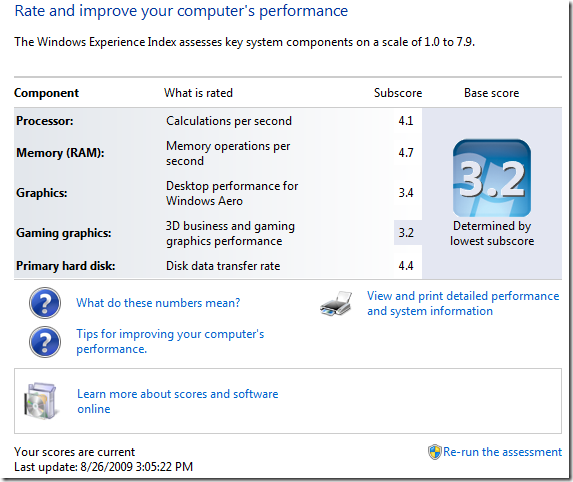
Oh, and by the way, here’s a shot of the Windows Experience Index:

wei

Not TOO shabby, eh?

Monday, July 13, 2009

Windows 7 going Gold? Nope

For some time now, people have speculated about when Microsoft will announce the “gold” RTM (release-to-manufacturing) of Windows 7. First, it was July 18, then the July 13 rumors started. Well, there is indeed a build 7600 that appeared today, but Microsoft has broken the silence and denied that this is the coveted final version. Nevertheless, the appearance of this build (on the usual slew of P2P networks) is suspicious – the latest known build was somewhere in the 7260 range, so this jump may mean that Microsoft has made significant progress in finalizing the code. Finally, note that the official build number of the final release has NOT been determined.

Thursday, June 4, 2009

Hackers Targeting Windows XP-Based ATM Machines


Hackers Targeting Windows XP-Based ATM Machines | Maximum PC

Wow, whose bright idea was it to put XP on a highly sensitive, mission-critical machine that processes privileged information and holds large sums of money? It would really, really suck to have a BSOD right before the cash drawer was supposed to open. This takes spyware to a whole new level…yikes. Windows belongs nowhere near an ATM.

Tuesday, May 26, 2009

Get Your Windows Vista Service Pack 2 Now

sp2

Microsoft has released Service Pack 2 for Windows Vista (and Server 2008), so grab it now either off of Windows Update, as a standalone installer, or an ISO:

SP2 for x86 32-bit
SP2 for x64 64-bit
SP2 ISO Image

For more info, check out the release notes.

Tuesday, April 28, 2009

Office 2007 SP2 Released

The second service pack for Office 2007 has been released. Highlights include ODF document support and the usual slew of stability/performance enhancements. Get your 290MB copy either from Microsoft Update or from the official download page:

http://www.microsoft.com/downloads/details.aspx?FamilyID=b444bf18-79ea-46c6-8a81-9db49b4ab6e5&displaylang=en

Tuesday, April 7, 2009

Check out a book…with Google Book Downloader

Google Book Search and its ambitious scanning project have put many of the world’s finest literary and scientific works at our fingertips. One can download entire works if they are public domain or are no longer under copyright, but for current-market books only a preview of a certain number of pages is allowed. So…let’s say, hypothetically, that you DESPERATELY need the full text of a book, but don’t feel like making a late-night trip to the library. What then? Why, it’s Google Book Downloader to the rescue!

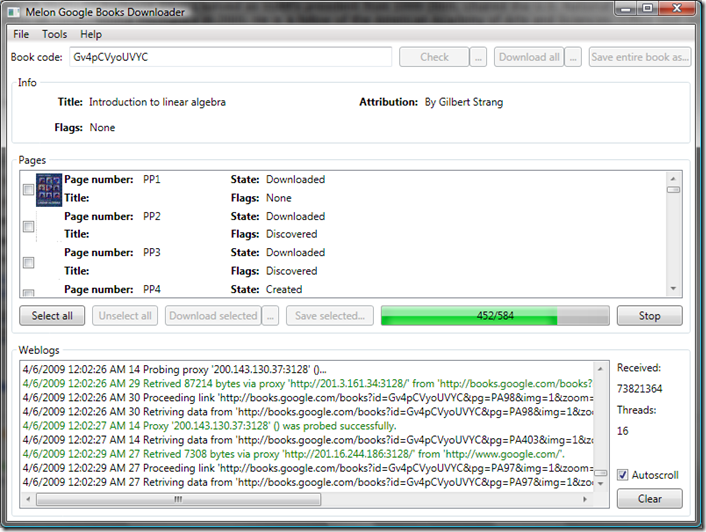
This handy little tool, written in C#, solves your literary woes. Simply input the Google BookID (found in the URL of the original Google Books page) and hit Check. Once that completes, click “Download All” and GBD does the rest by systematically downloading the pages in a randomized order (boy, does that make sense :) Finally, click “Save entire book as” the temporary downloaded pages are compiled into a nice, neat PDF. The GUI could use a little work, but once you figure out how to use the tool things work out nicely. PDF creation is handled by iTextSharp, the C# port of the popular iText Java library.

GBD in action:

gbd

http://googlebookdownloader.codeplex.com/ (.NET Framework 3.5 is required.)

Note that I do NOT condone any illegal or unsavory use of this software. Have a nice day.

Tuesday, February 3, 2009

Windows 7 will only have three versions


» Microsoft simplifies the Windows 7 lineup | Ed Bott’s Microsoft Report | ZDNet.com

Finally, Microsoft has pulled its head out of the sand and simplified the Windows 7 edition lineup (for those of us who don’t lived in a third-world country, at least). There will be 3 clear-cut and easy to understand editions: Home Premium, Professional, and Ultimate (also called Enterprise for volume buyers). Unlike Vista, each edition will contain all features of the edition(s) below it: for example, Professional’s features are a superset of Home Premium’s features, and Ultimate will have all of Professional’s features. Yay! Now slack-off workers can play videos through Media Center will being connected to the corporate domain. Just what we need. But seriously, this is a much more elegant move on Microsoft’s part – no more confusion over what edition to get and heated discussions about which edition is most suitable. And no more hilarious parodies like this:

Tuesday, January 20, 2009

Microsoft Certifies 8-Year-Old Sysadmin

Microsoft Certifies 8-Year-Old Sysadmin | Maximum PC


They just keep getting younger and younger. I wonder...if a company hired this kid, how would the IT department respond?

Thursday, January 8, 2009

Get your Windows 7 Beta Tomorrow

How to Get Your Windows 7 Beta 1 on Friday | Epicenter from Wired.com

Sometime tomorrow, Friday, January 9, Microsoft will open up Windows 7 to the public by offering downloads of Windows 7 Beta 1 to the first 2.5 million visitors. Registration for a key is required, and the beta expires in August. If you want to get in on some next-gen Windows action, stay tuned to the official Windows 7 webpage throughout the day, as a specific time has not been announced.

http://www.microsoft.com/windows/windows-7/

Wednesday, December 24, 2008

Windows Vista: The Real Story

It seems that everyone's mind has been solidly inundated with horror stories about Windows Vista and how bloated and slow it is and how horribly it runs on not-so-new computers. I have been using Vista now for quite some time, both on a low-end single-core desktop and a high-powered Core 2 laptop. Compared to XP, I am EXTREMELY satisfied with my Vista experience on both machines.

vista-logo

Vista: It ain't so bad...

The desktop in question is a true bargain-basement system, a lowest-of-the-low prebuilt Compaq. To be honest, it is slightly souped up, but the base specs would have had a hard time running even XP decently. I wasn't expecting much when I threw Vista onto this underpowered box, but I am quite pleased with the end results.

  • Compaq SR5110NX
  • AMD Athlon 64 @ 2.4GHz (single core Orleans chip)
  • ECS nForce4 430 motherboard
  • 1.5GB DDR2-667 RAM (up from the original 512MB)
  • ATI Radeon HD 2400 Pro/256MB DDR2 with VGA/DVI/HDMI (up from the original integrated GF6150SE)
  • nForce integrated Ethernet + Netgear WG311T wireless card
  • Seagate 7200.7 120GB SATA 3.0Gbps 7200 RPM HDD
  • no-name 16x Lightscribe DVD burner
  • Windows Vista Home Premium SP1
  • AMD/ATI TV Wonder 650 USB HDTV Tuner

A meager machine, no doubt, but guess what? This baby not only runs a stock install of Vista snappily enough, but can handle HDTV recording via Media Center any day. Average RAM consumption is about 450MB, well below the 1.5GB available. Thanks to the Radeon 2400 Aero runs fluidly.

So why the big disparity between perception and real-world performance? When Vista first came out back in January 2007, it had its share of issues. Computers were sold that were barely capable of running XP, let alone Vista; consumers hoping to invest in a cheap Vista computer were, unsurprisingly, disgusted. Intel took a lot of heat for selling substandard integrated graphics parts, which simply weren't up to snuff when running Vista's Aero interface. Vista did have demanding hardware requirements - the problem was that big-box computer manufacturers failed to prepare adequately for the Vista launch.

Now, the situation has improved, and virtually all consumer machines sold today are more than capable of running Vista - even on anemic integrated graphics parts. You will still find computers sold with only 1GB of RAM, but from firsthand experience I can say that Vista WILL run. Don't expect any miracles - budget computers are intended for easygoing tasks, so you get what you pay for.

Microsoft has also matured Vista with the release of Service Pack 1 (SP1) back in April 2008. Like any new OS, the RTM version of Vista was plagued with a slew of annoying bugs and glitches, which SP1 has helped to resolve. SP1 may also be responsible for improved system memory usage as well. In general, I find that a fully-updated Vista system is just as good as, if not better than, the same system running on XP SP3.

Maybe the critics were right in the beginning, but they sure as hell don't have a lot of credibility now. XP will remain around for the foreseeable future, but Vista is now a formidable contender in the Windows OS market. Now we wait and see what Windows 7 brings...